# Any MCP client
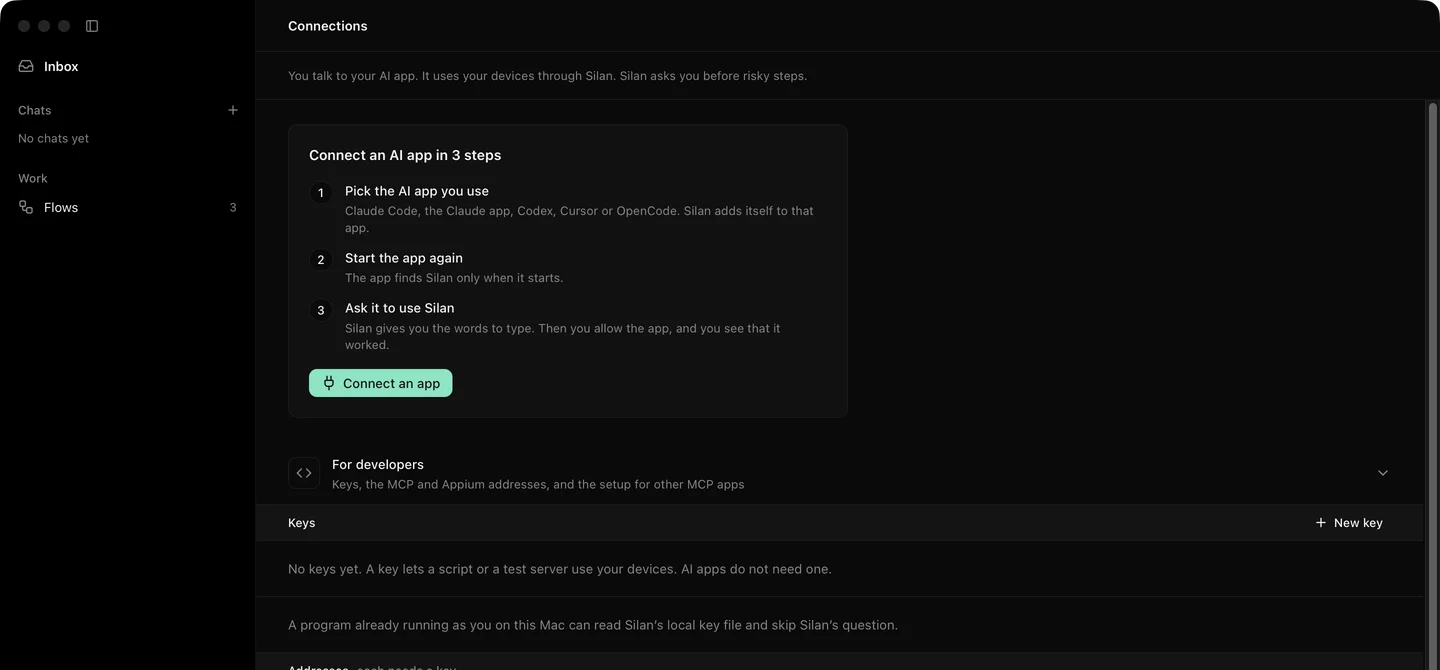
Give any MCP client Silan's tools, over stdio with the setup text from the Silan app, or over HTTP with a key.
Any app or agent that speaks MCP can use your devices. Over stdio, it starts `silan mcp`, the same server the one-click apps start, and Silan asks you once before the app may act. Over HTTP, it calls the engine's `/mcp` listener with a key and asks you nothing. Status: **supported**. The stdio way is proven with a plain MCP client on a Mac with no phone. The HTTP way is proven on an iPhone 11 (iOS 27) on a cable.
For developers on the Connections page: keys, then the addresses and the setup text for other apps below.
## Setup
### Over stdio, from the setup text
1. Open **Connections** in Silan's sidebar and open the **For developers** fold. Setup's **Your AI tools** shows the same text.
2. Under **The setup text for other apps**, press **Copy**. It is a complete `mcpServers` file:
```json
{
"mcpServers": {
"silan": {
"type": "stdio",
"command": "/Applications/Silan.app/Contents/Helpers/silan",
"args": ["mcp"],
"env": {}
}
}
}
```
Copying writes nothing on your Mac and holds no key.
3. Paste the `silan` entry where your app keeps its tool settings, beside any tools it has.
4. Pick the tool set with the arguments: `["mcp"]` is the `core` set of 16 tools, `["mcp", "--profile", "testing"]` the 27 of the testing set, `["mcp", "--profile", "full"]` every tool, 45 on the current release. The `SILAN_MCP_PROFILE` variable is read only by the plugin launchers in the Silan repository, not by `silan mcp` itself.
5. Start the app again, then ask it to list your devices. On its first tool call Silan asks you. An app with a Developer ID signature gets ** wants to use your devices** and the choices **Allow**, **Allow this time** and **Don't allow**. A program Silan cannot check gets **"" wants to use your devices**, the line **Silan can't check who made this program**, its full path, and only **Don't allow** and **Allow this time**.
`initialize`, `tools/list` and `ping` need no answer from you. A tool call waits up to 45 seconds. With no answer it ends with a message that Silan is waiting for you, and a late **Allow** counts on the next try. **Don't allow** answers the call with error `-32001`, and Silan refuses the app's calls for 10 minutes with no question.
### Over HTTP, with a key
For a client that speaks Streamable HTTP MCP, or a script on this Mac that should never see a question:
1. On **Connections**, under **For developers**, press **New key**. Give it a name, pick every device or some, and an expiry (30 days, 90 days, 1 year or never). Press **Make key** and copy the key: it shows once.
2. Point the client at `http://127.0.0.1:47800/mcp` with the header `Authorization: Bearer silan_sk_...`. The real port is in `~/Library/Application Support/Silan/engine.json`. Add `?profile=testing` or `?profile=full` to the address for a bigger tool set.
3. Send `initialize` with `Accept: application/json, text/event-stream`. The answer carries an `Mcp-Session-Id` header. Send it back on every later call, and `DELETE /mcp` with it to end the session.
The same key also works on stdio: `silan mcp --key silan_sk_...`, or `SILAN_API_KEY` in the environment, sends `silan mcp` to the engine's HTTP listener with no question.
## Try it
A first call from any client, after `initialize`: `tools/list`. With the core set you get 16 tools, `list_devices` and `observe` first. Then call `list_devices` with no arguments. On stdio, Silan's Allow sheet opens now. The answer is a JSON object with a `devices` list, empty when no device is attached. From a shell, with a key:
```sh
curl -s -H "Authorization: Bearer $SILAN_API_KEY" \
-H 'Content-Type: application/json' -H 'Accept: application/json, text/event-stream' \
-d '{"jsonrpc":"2.0","id":1,"method":"initialize","params":{"protocolVersion":"2025-06-18","capabilities":{},"clientInfo":{"name":"try","version":"1"}}}' \
-D - http://127.0.0.1:47800/mcp
```
The headers end with `200` and an `Mcp-Session-Id`.
## Limits
- Over stdio with no key, the testing set shows 27 tools: the five scenario tools are not served over XPC. Over HTTP with a key they are listed.
- Silan must be open on this Mac to ask you. With Silan closed, a stdio call ends at once with **Open Silan on this Mac to allow **.
- A program already running as you can read the engine's local key file and skip the question. The Connections page says so.
- A risky step answers `isError` with code `APPROVAL_REQUIRED` until you say yes in Silan, then the same call works.
- Revoking a key or disconnecting an app stops it on MCP at once, and ends its open streams.
:::note[Proof]
Proved on this Mac with no phone, 24 Oct 2026, by a Silan worker: the copied setup text was valid JSON with no key, and a plain stdio MCP client used it as pasted. `list_devices` gave `{"devices":[]}`. An unsigned Python got **Allow this time** only, and **Don't allow** gave `-32001` with a retry refused in 0.0 s. A key through `silan mcp` with `SILAN_API_KEY` worked, survived a restart and got `401` after Revoke. Run `20261024-042236-97156`. Over HTTP on an iPhone 11 (iOS 27) on a cable, 14 Oct 2026: a session with the full tool list, a screenshot, and a launch that answered `APPROVAL_REQUIRED`. Run `20261014-154515-65263`. Source: verify-silan feature map, connections and api.
:::