# Agents that verify their own work
A coding agent changes your app, builds it, puts it on a real iPhone through Silan, drives it, records the check and says pass or fail.
Developers who let a coding agent write app code still have to pick up the phone and check the result. With Silan, the agent does that part too. Connected through MCP with the testing tool set, it installs its build on a real iPhone, opens the app, taps through the change, records the screen and gives a verdict with the film. You read a pass or a fail instead of tapping through the app yourself.
## A worked example
Your app is CalTrack, a made-up habit tracker with a water row that counts cups. You ask your coding agent: add a minus button next to the plus on the water row, check it on my iPhone with Silan, and record the check.
The agent edits three files and builds. It calls `list_devices`, `claim_devices` and `install_app`. Silan asks you once: **Claude Code wants to use your devices**. You press **Allow**. The agent calls `start_recording`, opens CalTrack fresh, scrolls to the water row and taps the grey minus at zero cups. A sheet opens that should not. The agent has found a bug in its own change. It fixes the code, builds again, installs again and checks again: minus at zero does nothing, plus twice gives two cups, minus gives one, three more taps stop at zero with the words `Water intake cleared.` It calls `stop_recording` and `release_devices`, and answers **PASS** with a table of six checks and the path of a 44 second MP4.
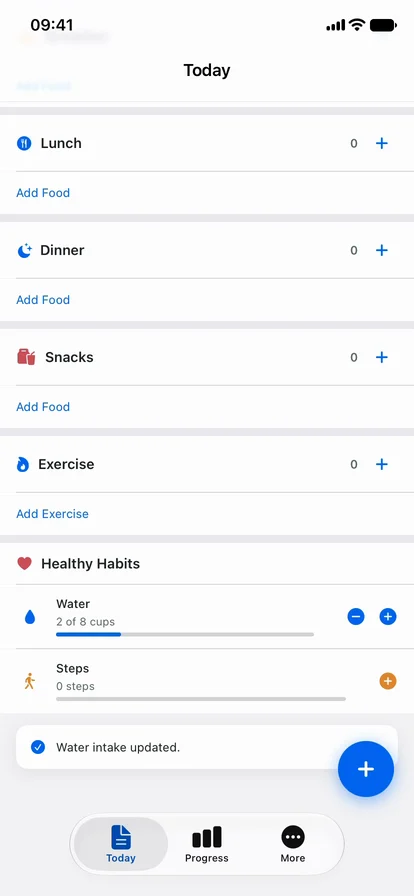
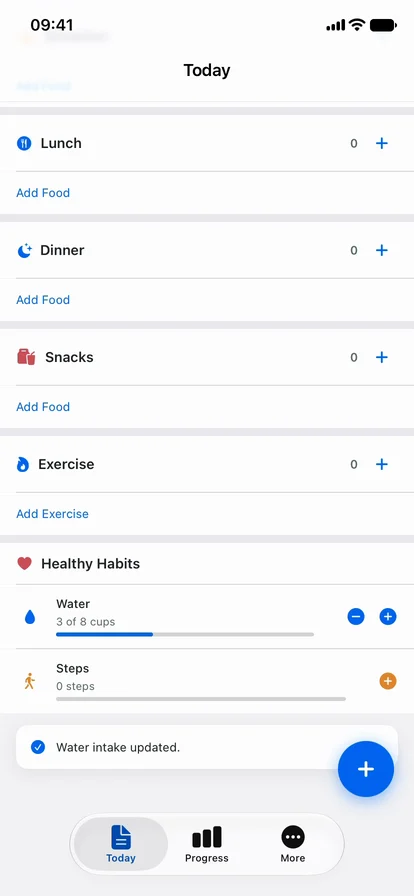
The phone film from a check run by an agent loop: it taps plus and minus on the water row and reads the count back (recorded 44 s).A pass: two taps on plus give 2 of 8 cups.A fail the agent caught: minus added a cup instead of taking one away.
The same loop on a teammate's broken commit, where minus adds a cup, ends **FAIL** and names the line of code with the wrong handler. Both verdicts matched the app's own saved data on the phone.
## Steps
1. Set the iPhone up with the Developer way, because installing a build and reading the element list need it ([Devices](/devices/)).
2. In Silan, open **Settings › Connections**, press **Connect** next to Claude Code (or Codex, Cursor or OpenCode). Silan asks **Do you test your own app with Claude Code?** Press **Test my app**. That writes the testing tool set, which has `install_app`, `start_recording` and `stop_recording` ([Connections](/features/connections/)).
3. Start a new session of the coding app in your project's folder.
4. Ask for the change and add: check it on my iPhone with Silan, and record the check. Tell it where your build script writes the app.
5. On the first Silan call, press **Allow** when Silan asks whether the app may use your devices. That comes once.
6. Answer the ask cards while it works. With **Ask me before paying, sending, posting or deleting** on, Silan asks before each install and before a tap on a button whose name has a word like Remove or Delete, in your own app too ([Safety](/features/safety/)).
7. Read the verdict. The recording is an MP4 under `~/Movies/Silan Recordings//`. Password fields in it are black.
## What is supported today
| What | Status |
|---|---|
| One-click Connect for Claude Code, Codex, Cursor and OpenCode with the testing tool set | Supported |
| The agent drives your app on a real iPhone and records the screen to MP4 | Supported |
| The agent installs its own build on a real iPhone through `install_app` | In testing |
| A connected AI app acting on a real phone from your own Mac, outside a test setup | In testing |
| Recording starts only when your app is in front | Coming soon (today the film starts with whatever the phone shows, often the Home Screen) |
| Step pictures handed back as files next to the recording | Coming soon (today the agent gets picture ids) |
| Headless use on a CI machine with no Silan window | Coming soon |
:::note[Proof]
Proved on an iPhone 11 (iOS 27) on a cable, 30 Oct 2026, by a Silan worker, through a private test setup (a private Silan engine and a headless Claude Code, not the owner's Silan): run A4, the agent's own change, ended PASS, and run B3, a change broken on purpose, ended FAIL, both checked against the app's saved data. One consent answer, no approval asks because the ask switch was off on that private engine. 22 Silan calls in A4, about 65 seconds from install to verdict. The passing film `demo.mp4` is 44 seconds with no black frames. Source: the agent-loop proof report of 29 and 30 Oct 2026.
:::