Integrations
Claude Code
Claude Code reaches your devices through silan mcp, Silan’s MCP server. The Silan app writes that server into Claude Code’s settings for you, and Claude Code starts it when a session begins. Status: supported. It is proven with real Claude Code on a Mac with no phone attached. A real Claude Code session acting on a phone from start to end is in testing: that proof is still owed.
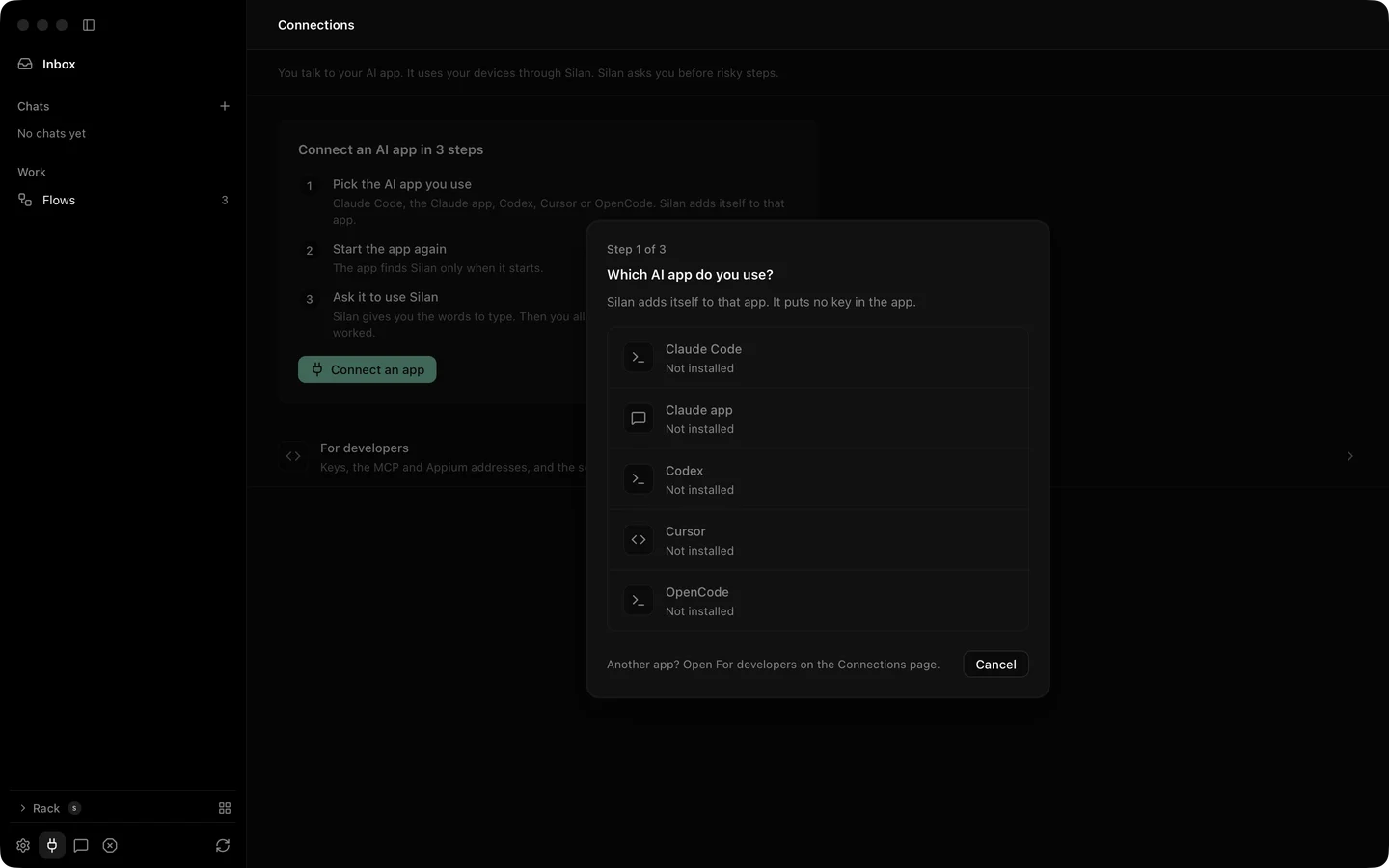
One click from the Silan app
Section titled “One click from the Silan app”-
Open Connections in Silan’s sidebar, or setup’s Your AI tools. Press Connect an app, then Connect on the Claude Code row.
-
Silan asks Do you test your own app with Claude Code?
Answer Tool set Tools Just my devices core16: look, tap, type, swipe, wait, open apps and links, hand over logins Test my app testing32: core plus installs, recordings, flows, checks, test pushes, notifications, clipboard, location, text size, rotation -
Silan writes one entry,
mcpServers.silan, into~/.claude.json:"silan": {"type": "stdio","command": "/Applications/Silan.app/Contents/Helpers/silan","args": ["mcp", "--profile", "testing"],"env": {}}Just my devices writes
"args": ["mcp"]. Every other byte of the file stays as it was, and the first time Silan changes the file it keeps a copy beside it,~/.claude.json.silan-backup. No key is written: Silan names Claude Code from the code signature of the process that startssilan mcp. -
Start a new session. A session that was open before Connect does not see Silan. In the terminal, type
/exit, thenclaude. In an editor, open a new Claude Code tab. -
Type
Use Silan to list my devices. On its first tool call Silan shows Claude Code wants to use your devices, with who signed it. Press Allow to keep the grant, Allow this time for a grant that ends when Claude Code quits, or Don’t allow. After Don’t allow, Silan asks again on the next try in 10 minutes. The call waits up to 45 seconds for your answer.
The Connect window follows along and says It worked once Claude Code’s first call came through. Pressing Connect again keeps the tool set you picked.
The plugin way
Section titled “The plugin way”The Silan plugin carries the same MCP server and Silan’s public skills: how to drive phones, text entry, waits, safety, and short maps of common apps. From a copy of the Silan repository:
claude plugin marketplace add /path/to/silan/Pluginsclaude plugin install silan@silanThe plugin’s launcher looks for the silan command at SILAN_CLI, on your PATH, at ~/.local/bin/silan, then inside /Applications/Silan.app and ~/Applications/Silan.app. It reads SILAN_MCP_PROFILE (core, testing or full) to pick the tool set, and stops with exit status 64 on any other value. If Silan is not installed it says so on stderr and exits with 127.
Try it
Section titled “Try it”Check the connection:
claude mcp listThe list shows a server named silan as connected while Silan runs (the plugin’s shows as plugin:silan:silan).
Then try a first prompt:
Use Silan to open the Clock app on my iPhone and start the stopwatch.You should see Claude Code call list_devices, then claim_devices, launch_app, observe and tap, each with a fresh observation of the screen. The first call brings the Allow sheet. Afterwards the Claude Code row on Connections reads Can use every device · used just now, and All chats gets an item that records what Claude Code did on the device.
Limits
Section titled “Limits”- A real Claude Code session acting on a phone from start to end is not yet proved on a real device. Every Connect proof ran with no phone attached.
- Over Connect,
silan mcpspeaks to the engine over XPC. The testing set then shows 27 tools: the five scenario tools are not served that way. - A risky step answers
APPROVAL_REQUIREDuntil you say yes in Silan. The agent asks before it pays, sends, posts or deletes. See Safety. - Silan must be open on this Mac to ask you. With Silan closed, the call ends at once with Open Silan on this Mac to allow Claude Code.
~/.claude.jsonmust be a JSON object. Silan leaves any other file alone and tells you to fix it first.- Manage on the row changes the devices the grant covers. Disconnect ends the grant and takes the
silanentry out of~/.claude.json, byte for byte, so Claude Code does not ask again. - A program that only calls itself “Claude Code” is not Claude Code. Silan trusts the signature, never the name.